AI advisor
The optional AI Advisor sends a compact summary of the current context to an LLM. It shows the answer as prioritised
recommendations. They say what to change in requests and limits, resilience, scheduling constraints, node health, node
pools and cost. Each one comes with a concrete YAML snippet or kubectl command.
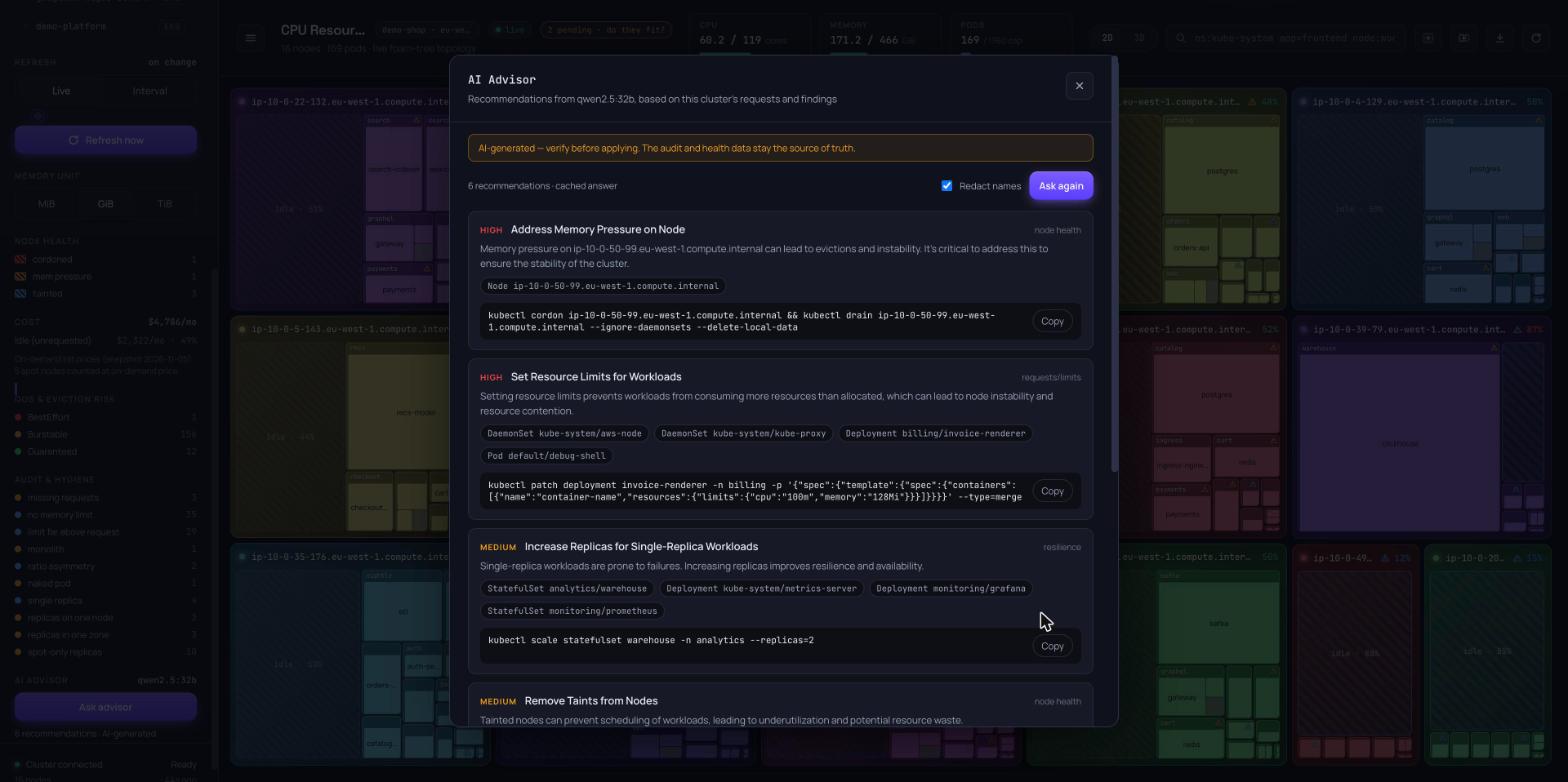
The dashboard already shows what is wrong. The advisor explains why it matters and what to change. It works from the same audit and node health data, and that data stays the source of truth. Rules:
- Off by default. Without an API key the panel is hidden, and nothing leaves your machine.
- Read-only. The advisor only suggests. It never applies a change, and k8sfoams still never writes to the cluster.
- Consent first. The first ask in a page load shows exactly what k8sfoams will send. It sends nothing before you press Send.
Enable it
| Variable | Default | Meaning |
|---|---|---|
OPENAI_API_KEY |
none: advisor off | API key of an OpenAI or OpenAI-compatible endpoint |
OPENAI_BASE_URL |
OpenAI | base URL of an OpenAI-compatible endpoint (Ollama, vLLM, Azure OpenAI, …) |
K8SFOAMS_ADVISOR_MODEL |
gpt-4o-mini |
model name |
k8sfoams reads the key from the environment only. A command-line flag would leak it into shell history and ps. It stays on
the server: the browser only learns whether the advisor is on and which model it uses.
A local model with Ollama
Nothing leaves your machine:
ollama pull qwen2.5:32b
OPENAI_API_KEY=ollama OPENAI_BASE_URL=http://localhost:11434/v1 K8SFOAMS_ADVISOR_MODEL=qwen2.5:32b k8sfoams
Ollama ignores the key, but one must be set. The model needs JSON-schema structured output. Local models are slow: a 32B model on a laptop GPU takes about 3 to 5 minutes per answer. k8sfoams gives the request up to 10 minutes.
What is sent
One system prompt and one JSON summary of the context, about 2k to 3k tokens on any cluster size. k8sfoams builds the summary from the same data as the dashboard, so it needs no extra calls to the cluster. The summary holds:
- totals and allocation (requested vs allocatable CPU and memory, hourly cost) per node pool and per zone
- node warnings (cordoned, NotReady, pressure, taints, stranded devices) with up to 10 node names each
- audit findings with the count of pods and the 10 workloads most affected by each
- the QoS mix and the namespaces with the most BestEffort / Burstable pods
- per device resource (GPUs): allocatable, requested, and how the free units are spread over nodes
- the 10 namespaces requesting the most CPU
- the pending pods simulation: how many waiting pods would fit now, how many are gated, and why the rest cannot fit, per reason and for the 10 namespaces with the most of them
- the consolidation simulation: how many nodes could go alone, which nodes a drain could empty together, the CPU, memory and hourly cost that this frees, and what blocks the other nodes
The simulations run on every ask. On 100 nodes and 1.5k pods they take about 0.4 s.
k8sfoams never sends labels, annotations, images, environment variables or anything else from pod specs.
Advice on what you are looking at
With a query or a pinned workload on the map, the advisor looks only at those pods and the nodes they
run on. The consent step says so ("Scoped to 51 pods of the query"), and the summary carries
"scope": {"pods": 51, "ofPods": 169}. A scoped summary leaves out the cluster-wide simulations. Clear the
query and the pin to ask about the whole cluster.
Redact names, on by default, replaces node, node pool, namespace and workload names with stable placeholders
(node-3, pool-1, ns-2, workload-7). The mapping stays on the server. The server turns the placeholders in the
answer back into real names, so Highlight works the same either way.
The consent step shows the messages exactly as k8sfoams will send them. The data comes from the cluster at that moment, so on a changing cluster, the summary sent on Send can differ slightly from the preview.
Recommendations
The panel sorts the cards by severity (high, medium, low). Each card carries a category. Each affected object is a chip:
- a workload chip pins the workload, as a click on one of its pods does
- a node, node pool or namespace chip sets the
node:,pool:orns:query
Copy puts the suggested change on the clipboard. Every answer carries the label AI-generated — verify before applying.
When the provider reports token usage, the status line shows it (· 2,412 tokens).
The server caches the last answer per context. If you ask again while the cluster stays the same, the server returns that answer immediately and spends no tokens. A changed cluster gives a new summary and a new request.
Errors from the provider come back as a message in the panel. k8sfoams does not retry automatically. The errors are an
invalid key (401), a rate limit (429), a timeout (504), an unreachable endpoint or malformed model output
(502).
Ask a question
Ask a question, under Ask advisor in the sidebar, opens a chat with the same model. It answers questions about using k8sfoams ("How do I simulate draining a node?") and about the cluster on screen ("Which namespace requests the most CPU?"), and follow-ups such as "How do I find its pods on the map?".
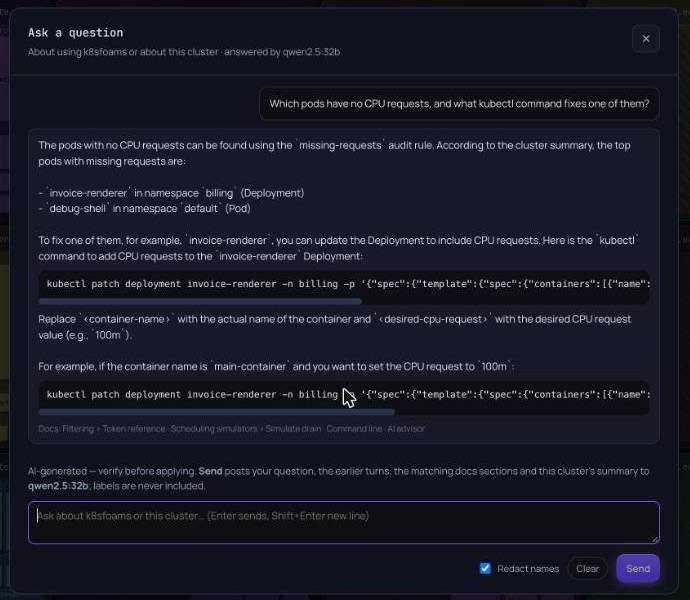
Each question sends:
- the question, and the last 6 turns of the chat
- the sections of these docs that best match the question and the previous one (a keyword search, about 6000 characters), plus the query token reference, which goes with every question
- the same cluster summary the advisor sends (see What is sent), for the whole cluster
- details of up to 3 nodes, namespaces or workloads that the question or the previous one names. A pod's name stands
for its workload. Container names go only with Redact names off.
- a workload: its pod count, nodes, QoS, findings and one pod's per-container requests
- a node: its pool, zone, instance type, warnings, taints, allocation and biggest workloads
- a namespace: its QoS mix, findings and biggest workloads
The docs ship inside the package, so it works offline with a local model. Type a question and press Enter (Shift+Enter adds a new line). The answer appears as the model writes it. Answers are AI-generated: they can be wrong, so check a fact on the map before you act on it.
A query in the answer, such as ns:payments qos:BestEffort, is a chip: a click applies it to the map. A one-line code
block holding a query gets an Apply query button. Commands such as kubectl get pods stay plain code. Under each
answer, the panel lists the docs sections that k8sfoams sent and, when the provider reports it, the token count.
Redact names is shared with the advisor. With it on, k8sfoams replaces real node, pool, namespace and
workload names in your question and in the earlier turns with their placeholders before it sends them. Then it maps
the answer back. So you can ask about payments-api by name.
The chat lasts until you reload the page or switch the context. Clear starts it over. The server does not cache chat answers.
The keyword search finds a docs section when the question uses its words. If an answer misses, rephrase with the feature's name: drain, query, consolidation, QoS.
The live demo has no server and no LLM, so the panel is hidden there. See HTTP API for the endpoints.